

AI Hand Fixer for Malformed Fingers and Hands

Vismora's AI Hand Fixer edits malformed hands in an uploaded photo or artwork. Its hand-focused prompt checks each visible hand, repairs extra, missing, fused, or twisted fingers, and accounts for overlapping hands and object grips while asking the model to leave correct hands and unrelated image details unchanged.

Part of Vismora's Enhance & Upscale toolkit.

Try AI Hand Fixer Now

Upload your photo and see the AI in action — free to try

Upload Image

Click to upload or drag & drop

JPG, PNG, WebP up to 20MB

Processing Mode

Sign in to get 12 free credits

Result

Your result will appear here

Want more advanced features? Try our full editor →

How It Works

Get professional results in three simple steps

1

Upload the Image with a Broken Hand

Choose one JPG, PNG, or WebP image up to 20MB. Use the clearest available export; tiny, cropped, heavily hidden, or motion-blurred hands give the model less information about the intended gesture.

2

Choose an AI Hand Repair Prompt

Start with Complete Hand Repair, or select a focused preset for finger count, fused or overlapping hands, object grips, or illustrated artwork. You can edit the prompt before generating.

3

Inspect Every Hand and Download

Compare the result with the original. Count the fingers, check thumb placement, joints, wrists, object contact, faces, text, and background details, then download a result only when the anatomy and surrounding image look right.

See It in Action

Real examples showing the transformation power of our AI

Before
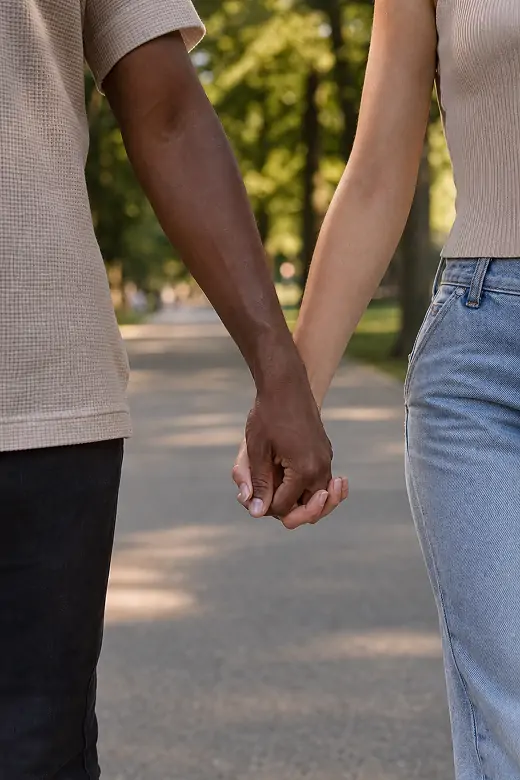
Before - Overlapping Fingers Repaired in a Hand-Holding Photo
✨ AI Result
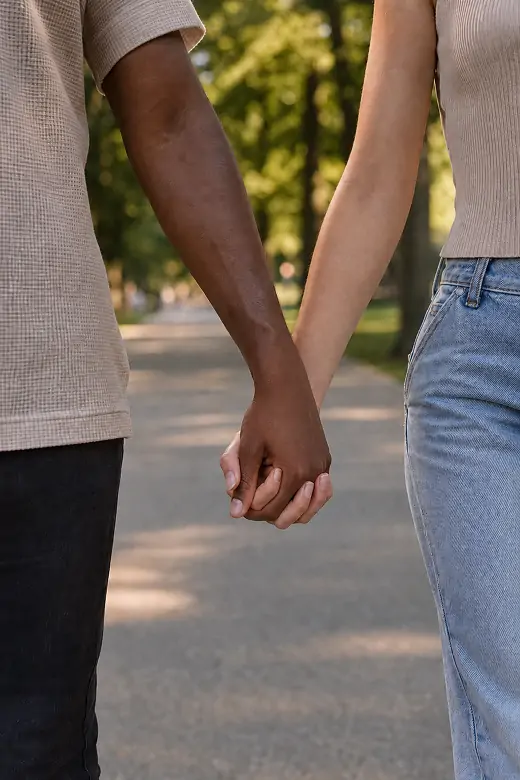
After - Overlapping Fingers Repaired in a Hand-Holding Photo

Overlapping Fingers Repaired in a Hand-Holding Photo

Two people hold hands on a park path, but the original contact contains crowded, ambiguous fingers at the center of the grip. The edited version separates the visible fingertips and makes the interlocked hand structure easier to follow while the beige shirts, blue jeans, arms, and tree-lined background remain recognizable. Overlapping anatomy is subtle, so both hands still need close review.

Overlapping HandsFinger SeparationHand-Holding Photo
Before
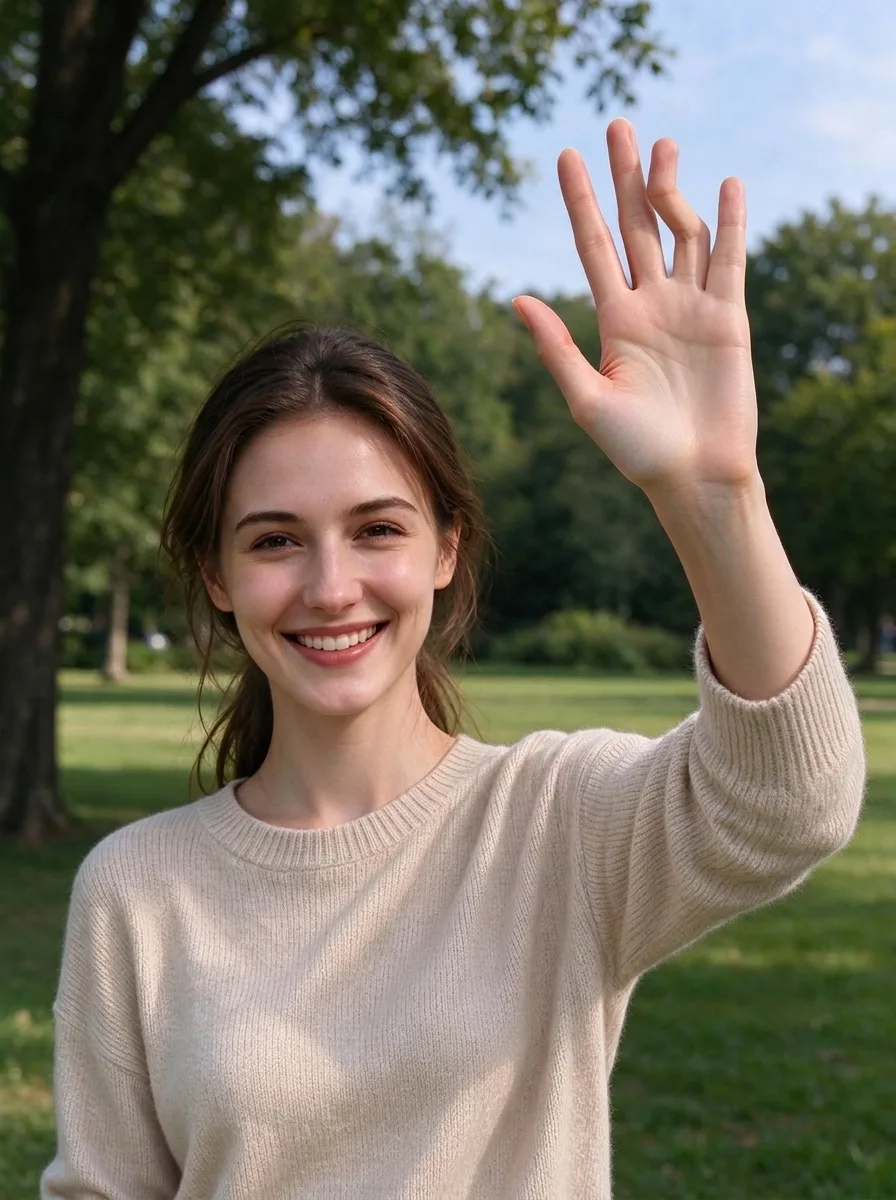
Before - Extra Finger Removed from a Waving Hand
✨ AI Result
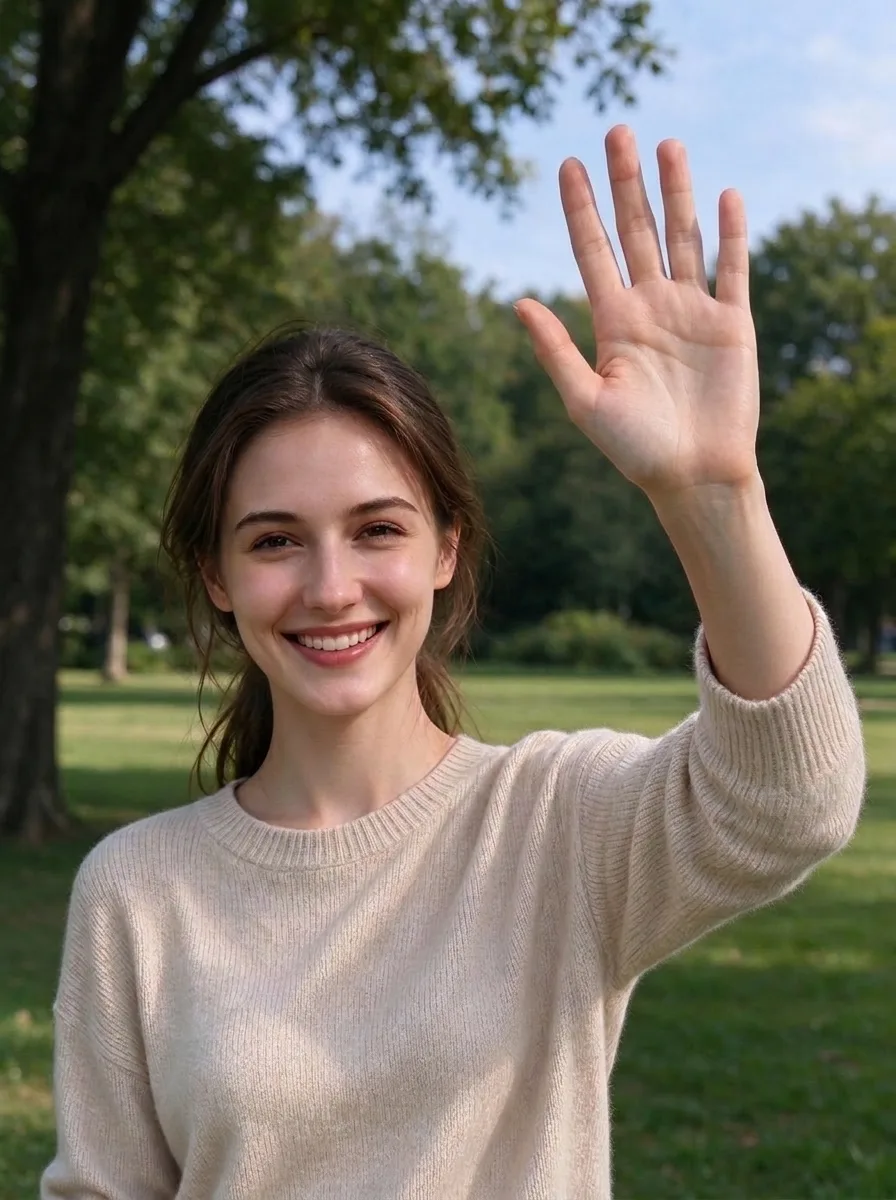
After - Extra Finger Removed from a Waving Hand

Extra Finger Removed from a Waving Hand

The raised hand in this park portrait initially shows six finger-like digits, including a sharply bent central finger. After the AI hand repair, the gesture has one thumb and four extended fingers with clearer spacing. The woman's face, beige sweater, raised-arm pose, and green park remain similar, although the hand shape and finger lengths visibly change.

Extra FingerWaving HandPark Portrait
Before
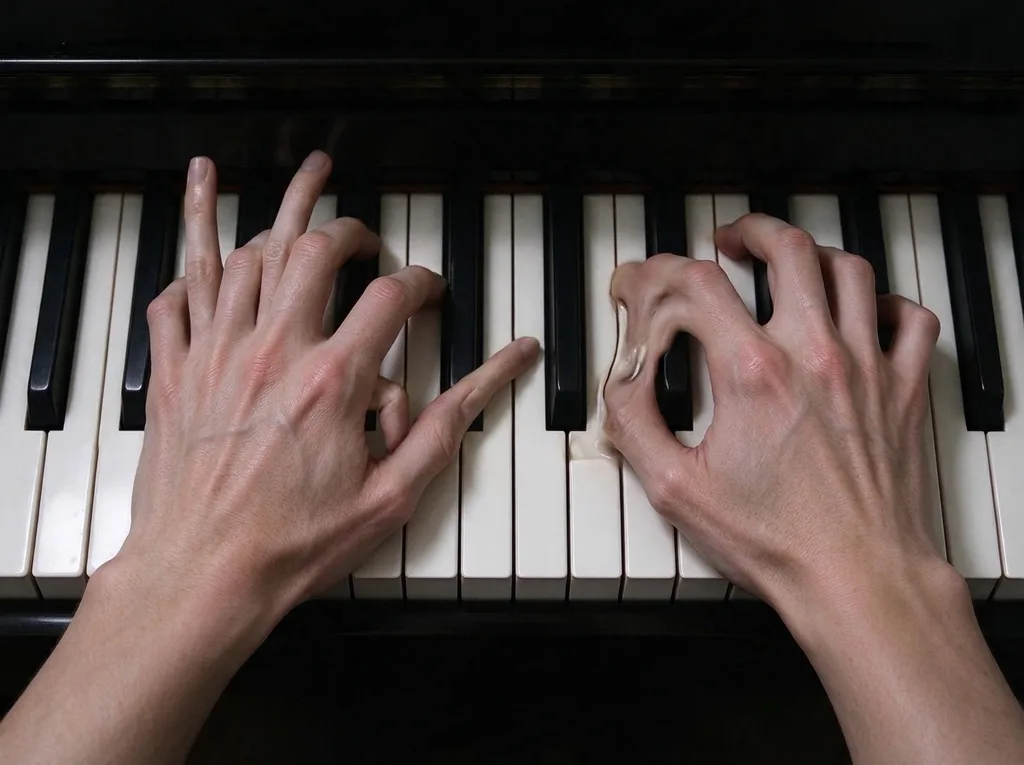
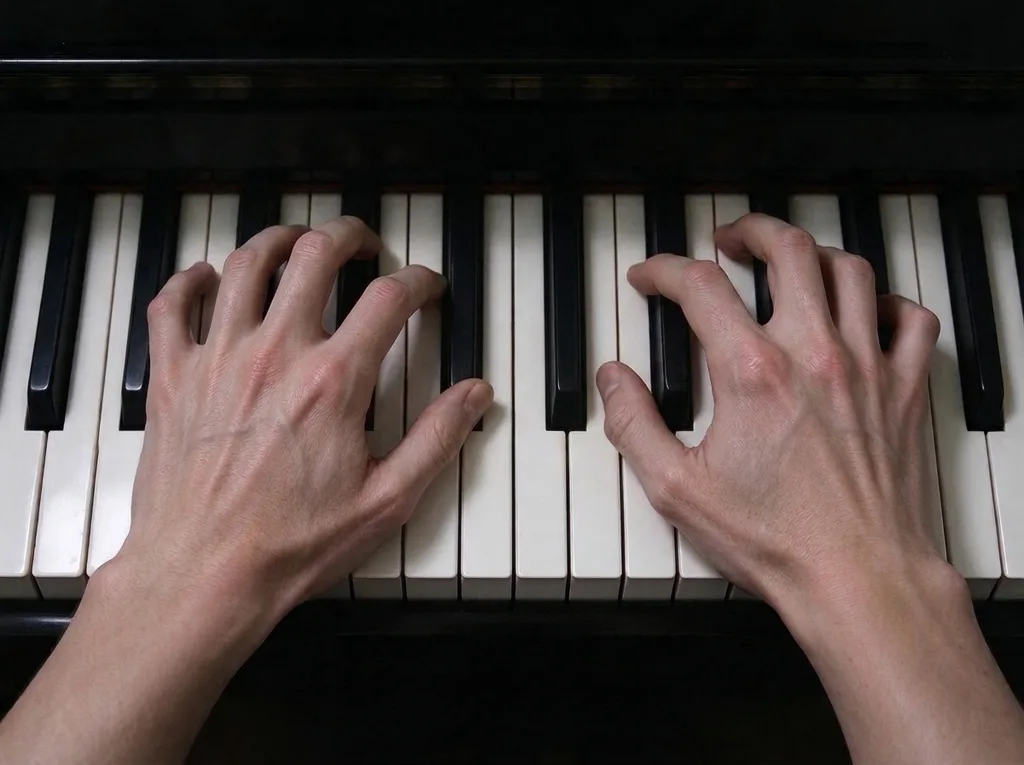
Before - Melted Fingers Repaired on Piano Keys
✨ AI Result
After - Melted Fingers Repaired on Piano Keys

Melted Fingers Repaired on Piano Keys

An overhead piano image begins with elongated and melted fingers, including a right-hand digit that blends into a black key and distorted contact on the left. The edited image rebuilds shorter, separated fingers positioned over the keyboard while retaining the two-hand composition and piano layout. Check the exact fingering and key edges if musical accuracy matters.

Piano HandsMelted FingersObject Contact
Before
Before - Six-Finger Hand Repaired in a Fantasy Portrait
✨ AI Result
After - Six-Finger Hand Repaired in a Fantasy Portrait

Six-Finger Hand Repaired in a Fantasy Portrait

A stylized fantasy portrait shows a raised palm with a thumb and five fingers. The repaired version reduces the hand to one thumb and four fingers while keeping the silver-purple embroidered costume, jewelry, misty violet setting, and portrait framing recognizable. Finger spacing, palm contour, and some facial detail differ between the two images.

Six FingersFantasy PortraitStyle Preservation

Key Features

Powerful tools designed for professionals

Repair Extra or Missing Fingers

The prompt asks for one thumb and four naturally arranged fingers on each repaired hand while retaining the most plausible original gesture and orientation.

Separate Fused and Overlapping Hands

For clasped or touching hands, the repair instructions distinguish which fingers belong to each hand and preserve the intended contact between people.

Rebuild Believable Object Grips

Hands holding cups, phones, instruments, and other objects are prompted to wrap around or rest on the object naturally without fingers merging into its surface.

Match Photos and Illustrated Styles

The prompt requests matching skin, light, perspective, and detail in photos, while retaining line work, shading, proportions, and brushwork in anime or illustration.

Frequently Asked Questions

Everything you need to know

How do I fix AI-generated hands?

Upload the image, choose the preset that matches the visible error, and generate the edit. Start with Complete Hand Repair when several problems appear together. Afterward, count the fingers on every hand and inspect joints, wrists, contact points, faces, text, and background details before downloading.

Can the AI Hand Fixer remove extra fingers or add missing fingers?

The prompt specifically asks the model to repair extra and missing fingers while preserving the intended gesture. The result is generative, so correct finger count and anatomy are not guaranteed. Small, cropped, hidden, or severely distorted hands may need another attempt or manual retouching.

Can it fix fingers fused with a cup, phone, or instrument?

Yes, use the Object Grip Repair preset. It asks the model to rebuild the hand-object contact so fingers wrap around or rest on the object naturally. Check both the hand and the object afterward because labels, edges, strings, keys, and other small details can change.

Does the hand fixer work on anime and illustrations?

The Illustration & Anime preset asks the model to preserve the source line work, shading, proportions, and visual style rather than convert the image into a photograph. Results vary with the hand's size, visibility, and the consistency of the original artwork.

Will the rest of my image stay exactly the same?

The prompt tells the model to change only incorrect hand regions and preserve faces, pose, clothing, objects, background, lighting, colors, and composition. Exact pixel-level preservation is not guaranteed because the workflow uses generative image editing. Always compare the full result with the source.

Is Vismora's AI Hand Fixer free?

The tool requires sign-in and uses account credits. Each generation costs 10 credits; check your account for available introductory or purchased credits. Downloading a completed result does not use an additional generation credit.

What image formats, sizes, and output resolution are supported?

Upload one JPG, PNG, or WebP image up to 20MB. The workflow uses the model's 2K output setting and chooses a supported aspect ratio close to the source, so it does not guarantee identical pixel dimensions or an exact aspect-ratio match.

What an AI Hand Fixer Should Repair

AI-generated hands can fail in several different ways: a waving hand may have six fingers, a peace sign may contain fused digits, two clasped hands may blend into one shape, or fingers may melt into a cup, phone, or instrument. A useful repair instruction has to do more than say “fix the hands.” It needs to identify which regions are wrong, retain the intended gesture, and explain how the repaired anatomy relates to the wrist, camera, other people, and nearby objects.

The default prompt therefore checks every visible hand separately. Correct hands are meant to remain unchanged, while malformed hands are rebuilt with a thumb, four fingers, plausible joints, and perspective that matches the source. This distinction matters in group images where one person's hand is broken but several other hands are already usable.

Extra, Missing, Fused, and Twisted Fingers

Use the Extra or Missing Fingers preset when the gesture is readable but the finger count is wrong. Use Fused or Overlapping Hands when fingers merge, web together, or become difficult to assign to the correct person. Severe tangles provide less reliable source anatomy, so the model may infer a plausible gesture rather than reproduce every original contact exactly.

Hands Holding Cups, Phones, and Instruments

An object grip is a relationship, not just a hand shape. Fingers need to sit in front of or behind the object at the right places, bend around its surface, and create believable contact without cutting through it. The Object Grip Repair preset also asks the model to retain object details, but generative editing can still change labels, keys, strings, buttons, rims, and edges. Inspect both the repaired hand and the held object.

Clasped and Touching Hands

When two people hold hands or clasp fingers, count and trace each person's digits separately. A visually smooth result can still hide a duplicated thumb or a finger that changes ownership halfway through the overlap. Check the contact point, both wrists, and the connection to each forearm at full size.

Fix AI Hands Without Changing the Art Style

Photographic and illustrated hands need different surface treatment. In a photo, the repaired region should follow the existing skin tone, light direction, shadow softness, texture, depth of field, and camera perspective. In anime or illustration, realistic skin pores would be a style error; the repair should instead follow the source line weight, shape language, coloring, and shading.

The Illustration & Anime preset makes that boundary explicit. It still requests readable anatomy, but it does not ask for photographic realism. This can help preserve a flat cel-shaded hand, simplified cartoon fingers, or painted brushwork while correcting an obvious extra, missing, or fused digit.

What These AI Hand Fixer Examples Show

The four before-and-after comparisons above isolate different hand-generation failures. The waving and fantasy portraits show a clear finger-count correction from six visible digits to five. The piano example tests a harder relationship between several distorted fingers and a structured object, while the hand-holding example focuses on finger ownership and occlusion where two hands overlap.

These examples also show why reviewing the whole image matters. A repaired hand can have a clearer count and still change in palm shape, finger length, spacing, or contact. Faces and other details may shift between a generative before-and-after pair, and the corrected piano hands do not prove that the fingering is musically exact. Use the examples as evidence of the kinds of visible errors the prompt addresses, not as a guarantee that every image will be fixed in one pass.

How to Review an AI Hand Repair

Check the result from the hand outward rather than judging only the overall image:

  • Count one thumb and four fingers on each visible hand, allowing for digits that are naturally hidden by the pose.
  • Follow every finger from its base to its tip and look for forks, fused edges, detached nails, or a finger that belongs to two hands.
  • Check palm orientation, knuckles, wrist width, and the connection from wrist to forearm.
  • Inspect contact with cups, phones, clothing, instruments, furniture, and other people.
  • Compare faces, text, logos, jewelry, clothing edges, and background geometry with the original.
  • Keep the source file. If a repair changes unrelated details, retry from the original rather than stacking edits on an edited result.

AI Hand Fixer Limits

This workflow uses generative image editing rather than a manual hand mask or brush. The prompt can request a localized repair, but it cannot guarantee that every other pixel remains identical. Hands that are very small, cropped out of frame, hidden behind an object, heavily blurred, or tangled with several other hands may need another generation or manual retouching.

The tool repairs visible appearance; it does not recover the real anatomy that existed before an image was generated. For broader texture and lighting problems, try the AI Image Humanizer. To address a generally glossy or artificial result, use Remove AI Look from Photo. If the whole arm or body pose needs to change, use Change Pose in Photo.

More Enhance & Upscale Tools

Explore the rest of the Enhance & Upscale toolkit

Browse all Enhance & Upscale toolsSee every AI tool in the Enhance & Upscale collection

You Might Also Like

Related AI tools from other Vismora collections

Ready to Transform Your Images?

Try Vismora's AI-powered tools now. Free to start.